
A small product brand has one strong photo and no budget for a video shoot. An image-to-video AI tool can turn that photo into a short moving clip in a few minutes. The catch is easy to miss: every render, including the ones you throw away, draws electricity in a data center.
Free credits make it easy to start, but a sustainable business needs a habit it can keep for years, not just a good first week. The useful question is “how few renders does it take?” This guide covers what a five-second AI clip costs in energy, where wasted renders come from, a workflow built on Facy.ai that aims for a usable clip in one or two attempts, and how to make those habits last.
How Much Energy Does One AI Video Use?
Video sits at the heavy end of generative AI. MIT Technology Review estimated in 2025 that a five-second clip from one open-source model needed about 3.4 million joules, more than 700 times the energy of one high-quality image. Reporters compared that with running a microwave for over an hour.
Treat it as a rough scale, not a rule. Energy use depends on the model, the clip length, the resolution and the hardware. One independent analyst argued that MIT’s figure runs high and estimated roughly 7 to 214 watt-hours for a five-second clip, against the roughly 944 watt-hours that 3.4 million joules implies.
The sensible takeaway is not to trust any single number. It is to remember that video is a stack of frames, so every extra second and every extra attempt adds computing work.
Where Wasted Renders Come From
Most wasted renders trace back to a few habits:
- Vague prompts. The model improvises on whatever you leave out, so a loose prompt often needs several re-rolls.
- Starting at full size. Longer clips and higher resolution cost more, so a first draft at maximum settings spends the most on a simple motion test.
- “Make twelve, keep one.” Batches of near-identical versions turn a small saving into a net addition.
- Losing the file. Regenerating a clip you already made is pure waste.
That last one is easy to avoid. Facy.ai’s tool page notes that finished results are deleted soon after generation, so downloading straight away is a sustainability step as much as a convenience.
A Low-Render Workflow With Facy.ai
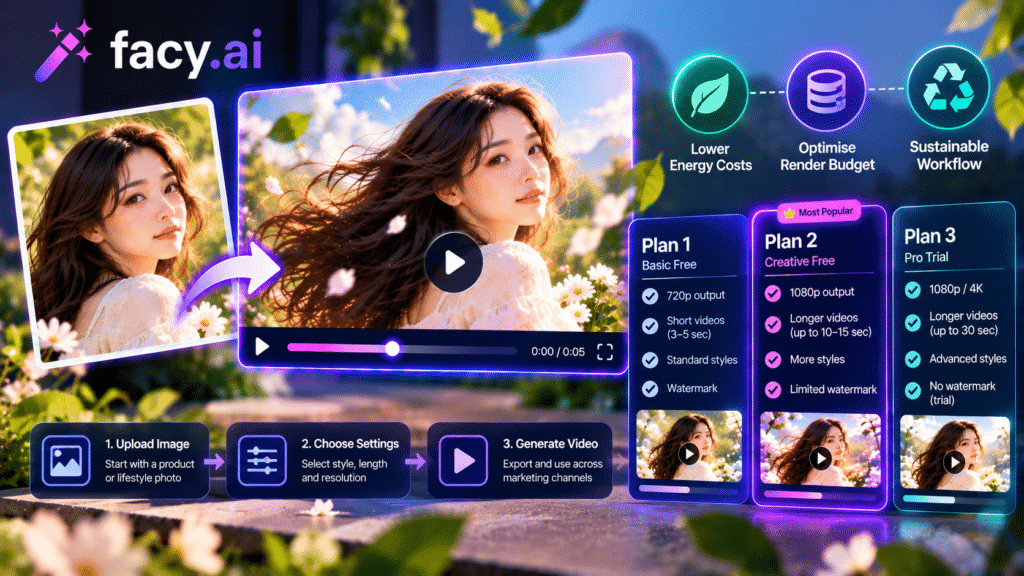
Facy.ai offers an image to video ai free tool that takes one photo as the first frame and generates motion from your prompt. You sign in with a free account to use available credits. Its Free plan lists medium quality and slower processing, which suits testing. The steps below keep attempts low.
- Pick one clear subject. Upload a photo with space around the subject, up to 20 MB. Crowded frames give the model more to guess.
- Write motion, then camera. The tool’s prompting guide uses one formula: motion description plus camera movement. For example: “steam rises from the coffee cup, slow push-in.”
- Say what stays still. End with “static shot” or “fixed camera” so the frame holds while the subject moves.
- Test small first. Choose a faster model and the shortest duration before stepping up. The tool offers several models, and the durations available depend on the model you pick.
- Download straight away, then stop. If the clip works, do not render variations for the sake of it.
- Set a cap before you start. For example, allow one asset at most three attempts.
Generation takes about 30 seconds to 5 minutes, depending on the model, duration, resolution and server load. Paid plans add 4K quality and fast processing, and each carries a monthly video allowance: 20 videos on Basic, 25 on Plus and 30 on Pro. A cap like that can double as a budget for attempts.
One honest limit: Facy.ai does not publish per-clip energy figures on its tool page. Any saving described here comes from fewer renders, not from a claim about the platform itself.
When Does AI Video Actually Save Resources?
It can, in the right case. A short product loop built from an existing photo may skip a reshoot, travel and shipped samples. But that only counts when the clip replaces something. If it is an extra asset nobody needed, the energy is spent and nothing is saved.
A simple test before you click: what would I do if this tool did not exist? If the honest answer is “nothing,” ask whether the clip is worth its footprint. If the answer is “reshoot,” the comparison may favor the clip, as long as you keep the attempt count low.
Because published figures vary so widely, track your own habit instead: attempts per finished asset. That number you can control.
Turning Low-Render Habits Into a Long-Term Practice
One careful clip is easy. The harder part is keeping the same discipline after the first month, when free credits start to feel like a tap that never closes. A few small rules do most of the work:
- Set a render budget. Decide how many attempts your team will spend each month, and treat free credits as a ceiling, not a target.
- Plan before you generate. Write the shot list and prompts first, so each render answers a question you already have.
- Reuse every good clip. One clip can serve a product page, a social post and an email header. Cropping or captioning an existing clip needs no new generation.
- Keep an archive. Store finished files next to the prompt that made them, so nobody regenerates what already exists.
- Review quarterly. Count attempts per finished asset, and ask whether the clips earned their place.
Do not build the plan on a free tier alone. Allowances can change, and a workflow that only works while credits are free is fragile. Treat the free plan as a test bench, then decide whether a capped paid plan fits your volume. On Facy.ai, for instance, paid plans carry a monthly video allowance of 20 videos on Basic, 25 on Plus and 30 on Pro, which can double as your render budget.
Use It Responsibly
Responsible use also covers people. Only upload images you own or have permission to use. Facy.ai’s terms ask you to confirm you have the right to upload the image and permission from anyone depicted, and they prohibit materials depicting people under 18. Its guidance also warns against animating someone’s likeness without consent and against deceptive or deepfake-style content.
FAQ
Is free image-to-video AI sustainable for the long term? Only with limits. The electricity is used whether or not a render is free, and providers can change free allowances at any time. Sustainable use comes from your own caps: a render budget, short test clips and a habit of reusing what you already made.
Do shorter clips use less energy? Generally, yes. A video is a sequence of frames, so fewer seconds means fewer frames to compute. The exact saving depends on the model.
Can I find the exact energy cost of one clip? Not reliably. Published estimates differ widely by model and method, so treat any single figure as a rough scale.
How long does generation take on Facy.ai? About 30 seconds to 5 minutes, depending on the model, duration, resolution and server load.
The Takeaway
The lowest-impact AI clip is usually the one you generate once or twice. Start with a clear photo, write a motion-plus-camera prompt, test small, download right away and cap your attempts. Then ask whether the clip replaces something real. If it does, a short loop can be a sensible trade. Make the habits permanent with a render budget, an archive and a quarterly review.