
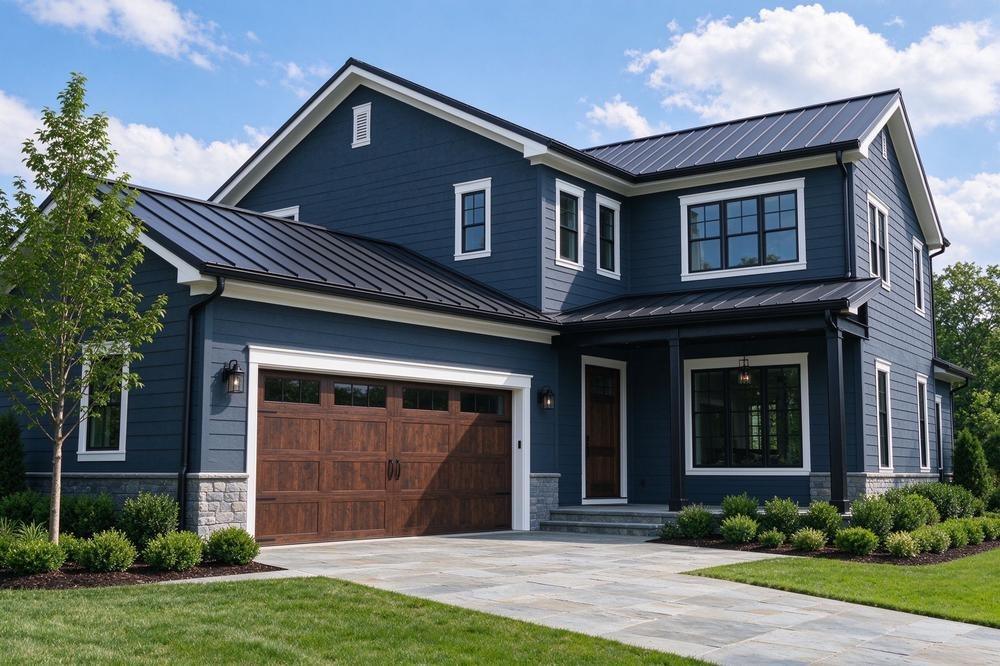
Few exterior repaints start from a blank slate. More often the job looks like this: a faded beige stucco body that has to go, dark bronze windows that are staying, a gray roof with fifteen years left on it, and a front door everyone agrees needs more personality. The new colors have to make peace with what stays, and they have to look right from the curb, not just on a two-inch chip held against the wall.
An exterior paint color visualizer lets you work that problem on a photo of the actual house. You can try a body color against the roof, check whether a trim white reads crisp or chalky next to the windows, and see how bold the door can go before it overwhelms the facade. What it cannot do is reproduce how paint will look in full afternoon sun on textured stucco, so the useful outcome is a short list of schemes worth sampling.
The nine tools below are compared on the jobs that matter outside: own-photo support, separate surfaces for body, trim, doors and accents, help with matching colors you are keeping, brand coverage, and saving or sharing schemes. The comparison is based on each tool’s documented features rather than accuracy testing.
Side-by-Side Overview
| Tool | Good task fit | Key features | Worth knowing |
| Paintuma | Repaints that keep one element, such as shutters or a door, and change the rest | Exterior sample scene or own photo; app adds exterior mode, AI segmentation, Color Picker, before/after records | Picker, segmentation and records are app features |
| Coloraw | Shopping one exterior scheme across several paint brands | Nine-brand web library, exterior scene and upload; app adds region detection, cross-brand alternatives, projects | Match suggestions are sample candidates |
| paintcolorvisualizer.com | Free, no-account tests, including on a listing photo | Surfaces painted separately, lighting presets, side-by-side compare, saved previews | Session-based; lighting presets are illustrative |
| Hover | Previewing major-brand palettes on a photo of your house | Upload inside or out, walls and trim, palettes by family, save and share | Described as free to get started |
| Benjamin Moore Color Portfolio | Identifying an existing exterior color in Benjamin Moore terms | Photo and AR video visualizers, virtual fan decks, optional ColorReader matching | ColorReader sold separately; Benjamin Moore only |
| CertaPro My PaintColors | Homeowners heading toward a painter’s estimate | Own photo or sample exteriors, walls, siding, trim and doors, three major brands | Hosted by a painting contractor |
| BEHR Color Visualizer / Paint Your Place | Home Depot shoppers planning around Behr exterior colors | Own-photo upload on the web, photo matching in the ColorSmart app | Behr colors only |
| Sherwin-Williams ColorSnap Visualizer | Matching an outdoor inspiration color to Sherwin-Williams | Web photo painting with brush or drag-and-drop, phone color matching | Manual edges on detailed facades |
| PPG Paint Color Visualizer | Browser-based previews in PPG colors | Own photo or inspiration images, touch-to-paint with edit tool, palette and name search | PPG colors only |
1. Paintuma
The “keep one thing, change the rest” repaint is where Paintuma earns its spot. Maybe the black shutters were replaced two years ago and are staying, or the stained front door is original to the house. Your new scheme has to be built around those elements, which means knowing roughly what color they are and seeing them against every body color you try.
The browser-based Paintuma Paint Color Visualizer supports the exploration stage: start with an exterior sample scene or upload your own photo, search real paint colors by name or code, or browse by brand and color family. The tool is built around exterior palettes for siding, stucco, doors and shutters, with brick, stone, roof color and landscaping treated as the context your colors need to suit.
Matching what you are keeping
In the Paintuma mobile app, the Color Picker lets you sample a color from the camera view, for example the existing shutters, and returns similar colors across brands with a match score. The score is a digital similarity measure, so it helps you rank candidates to sample rather than confirming an exact paint. Picked colors can go to Saved Colors or straight into the visualizer.
Surface-by-surface previews
The app’s AI Color Visualizer starts with a manual choice of interior or exterior mode, then segments the photo so the body, trim, doors and other surfaces can each take their own color. That lets you hold the shutters steady and cycle only the body and trim.
A record for the painter
Before-and-after comparison shows the change against the original house, and each scheme stores the brand and code used on every area. My Project keeps several versions for the same photo, so the final handoff to a painter is a list, not a memory.
Keep in mind that the picker, segmentation and project records are app-side features; the web page is best treated as the quick-look entry point.
2. Coloraw
Exterior paint often gets bought wherever is convenient, or wherever your painter has an account, which is not always the brand you fell for online. Coloraw is useful for exactly that gap. Its free web tool on Coloraw needs no sign-up, includes an exterior sample scene alongside interior rooms, and lets you upload a photo of your own house, with colors drawn from nine major brands such as Sherwin-Williams, Benjamin Moore and Behr.
The Coloraw app adds several tools that fit exterior planning:
Exterior region detection. After you photograph or upload the house, the AI identifies paintable areas. For exteriors the product describes walls, doors and windows, roof, garage, trim, porch and chimney as separate regions, so a garage door can take a different color from the entry door. Results depend on the photo, and trees or deep shade can make boundaries harder to find.
Cross-brand alternatives. Pick a body color and the app suggests close options from other brands. If your painter prefers a different line, you have candidates to sample rather than starting the search again. Treat them as similar colors, not identical formulas.
Color Capture. Aim the camera at the brick or stone you are keeping, or tap it in an uploaded photo, to see its HEX and RGB values and nearby brand colors. That gives you a concrete reference when choosing a body or trim color that coordinates with the masonry.
Projects with several schemes. Exterior projects are kept separate from interior ones, and one house photo can hold several schemes shown side by side with the original, listing each region’s brand, color name and HEX value.
These are app features rather than things the homepage alone provides, and previewing the roof or chimney in a new color is a visual test only, not a recommendation to paint those surfaces.
3. paintcolorvisualizer.com
Not every exterior question starts after closing. Plenty of buyers want to know whether a dated house could look good before they make an offer, and plenty of owners just want a no-commitment look at a bolder color. For those moments, a free browser tool with nothing to sign up for is the right weight.
At the time of writing, paintcolorvisualizer.com runs free in the browser with no account or install. You can upload a photo of a house, including a straight-on listing photo, or start from a built-in exterior scene. Surfaces are selected individually, so siding or stucco, trim and fascia, the front door, garage door and shutters can each hold separate colors, letting you judge the full composition at once.
The lighting presets are a particularly useful touch for exteriors. Switching between daylight, north-facing, warm LED and evening gives a rough sense of how a scheme might read on a shaded facade or under porch lights, though these are illustrative settings rather than a simulation of your lot. When a scheme works, compare it side by side with alternatives and save the image.
Uploads are session-based, so save previews before closing the page. A listing photo can also be heavily edited or shot at an angle, which limits how far you should trust any preview built on it.
4. Hover
Hover’s paint tool lets you upload an image of your home, inside or out, choose “Edit and Paint,” and try colors on walls, trim and more. Brand palettes, such as Behr and Valspar, can be browsed by popular collections or color family, and Hover describes the tool as working with other top brands as well. Favorites can be saved and shared with your team or contractor. Hover describes it as free to get started, so check current terms if you want more than basic visualizing.
5. Benjamin Moore Color Portfolio
This app is most interesting on the matching side of an exterior project. Paired with Benjamin Moore’s separately sold ColorReader device, the Color Portfolio app can match interior and exterior flat surfaces to more than 3,500 Benjamin Moore colors, showing the closest options. That is handy when you need to keep an existing trim color or touch up a painted door.
For previewing, the free app includes virtual fan decks, a photo visualizer where you mask surfaces, and an AR video visualizer that applies color in real time. Everything stays within Benjamin Moore’s palette.
6. CertaPro My PaintColors
If the project is heading to a professional crew, this tool from CertaPro Painters sits naturally between ideas and an estimate. You can upload a clear photo of your home’s exterior or use prepared sample exteriors, then apply colors to walls, siding, trim, doors and other available surfaces. Its library includes Sherwin-Williams, Benjamin Moore and PPG, and you can save ideas to sample in person. Because it is a contractor’s site, expect estimate prompts alongside the visualizer.
7. BEHR Color Visualizer / Paint Your Place
Behr’s visualizer lets you upload a photo and try Behr colors in it, with sample rooms available if you prefer to browse first. For exterior work specifically, the ColorSmart by BEHR app lets you take a photo and match colors from it to Behr paint using its photo-match tool, then save colors and project details. It is a practical pick if your paint will come from a Behr retailer, with the limit being a single-brand palette.
8. Sherwin-Williams ColorSnap Visualizer
ColorSnap Visualizer for Web lets you upload a photo or use a Sherwin-Williams scene, then drag and drop or brush colors onto surfaces. The brush allows careful work around trim and window casings, though on a detailed facade that means more manual effort. The free phone app captures colors from what you see outdoors and matches them to Sherwin-Williams paint, which helps when inspiration is a house down the street.
9. PPG Paint Color Visualizer
PPG’s visualizer works in a browser on phone or desktop. Upload a photo of your home or use PPG’s inspiration images, choose from color families and curated palettes or search by name, and touch or click to apply color, with an edit function for precise edges. It can also pull colors from a photo that inspires you. The palette is PPG-only.
Pick by Project Type
Full repaint with fixed roof and masonry. Look for separate surfaces and a way to reference what stays. Coloraw’s Color Capture and region detection, or Paintuma’s picker and exterior mode, both fit.
Trim-and-door refresh. You only need to change a few surfaces cleanly and compare options. paintcolorvisualizer.com, Hover or a brand tool you already shop with will usually be enough.
Matching an existing exterior color. A camera-based picker gives digital candidates; for a precise reading of a flat painted surface, Benjamin Moore’s ColorReader route or a paint store color match is the more dependable step.
Hiring out the work. Choose a tool that records brand and code per surface, or one tied to your contractor, such as CertaPro’s, so the scheme transfers without guesswork.
FAQ
Why does my house look different in the preview than from the street?
Phone cameras adjust exposure and white balance, screens vary, and exterior light changes with orientation, weather and time of day. Large paint samples on both a sunny and a shaded wall are the only reliable check.
Can I mix brands on one exterior?
Yes. Multi-brand tools such as Coloraw, Paintuma and paintcolorvisualizer.com let you try a body from one brand and trim from another. Just confirm each product is suitable for its surface.
Where to Start
Begin with what you are keeping. If it is a specific element you need to match or build around, start with Paintuma. If brand flexibility matters most because your painter or store will decide the product line, Coloraw is the better first stop. If you simply want to see whether the house could look good in a new color, whether you own it yet or not, open paintcolorvisualizer.com and try a few schemes. Then take the survivors outside as real samples.